Preparation for the Seminar
In order to communicate efficiently, please download the WeChat App,Didi, and Alipay or WeChat Pay for better communication,travel and online payment during and after the seminar.
How to Set Up Alipay?
All you need in order to make this work for you is a bank card, a passport or visa that are both valid and not expired, and an overseas phone number. Here the steps:
1. Download Alipay:
From the international version of the app store, download Alipay onto your device, making sure that your device is up to date with software for the best experience.
2. Enter your phone number:
Enter the international phone number as it was given to you when purchasing your phone and number.
3. Select the international version:
Specify that you want the international version of Alipay (rather than using the native version to Chinese users)
4. Choose Tour Pass:
Select the option for “Tour Pass”, which will take you to a properly designed part that helps you set up.
5. Load funds into the app:
Now you’ll need to load funds directly into the app, so decide how much you want to enter into it.
6. Enter your passport information:
Next you’ll enter your passport or visa information as requested (this helps make sure that everyone is valid and using Alipay with no hassles or swindles).
7. Enter your bank card information:
Lastly, enter your bank card information and make sure it is accurate (this is used to pay as well as load more information) to your information back home for billing.
How to Use Alipay To Pay for Things?
Option 1: Merchants scan your QR code:
When you get to the sales counter, you can display your QR code in the Alipay app and the merchant will scan it using their system to do so. This charges the right amount and all you need to do is hold your phone out.
Option 2: You scan their QR code:
The second option is that they can show you their merchant QR code and you can scan it yourself. For those that tend to enjoy that approach, make sure you know to ask for their code and that you have your phone ready to scan it. Try a few practice runs, too!
It’s as simple as that! When paying for something using Alipay, you’ll find it’s not only the most convenient option, it’s the way that both large and small vendors expect and are ready for. Since it’s used by locals, Alipay for foreigners works essentially the same way and is the preferred method especially when there’s a language barrier or cultural one to deal with as an inexperienced traveller.
Enjoy Your Cashless Experience!
How to use WeChat
WeChat is one of the most popular apps in China. Throughout the seminar, WeChat will be used as the instant communication tool between participants and seminar coordinator. Download the latest version of WeChat APP on your mobile phone. Open the WeChat app, tap “Sign Up” and “Sign up with mobile”, choose your region code, enter your mobile and set a password. One mobile phone number can only be used for creating one WeChat account.
Step by Step Instructions
Step 1: Download
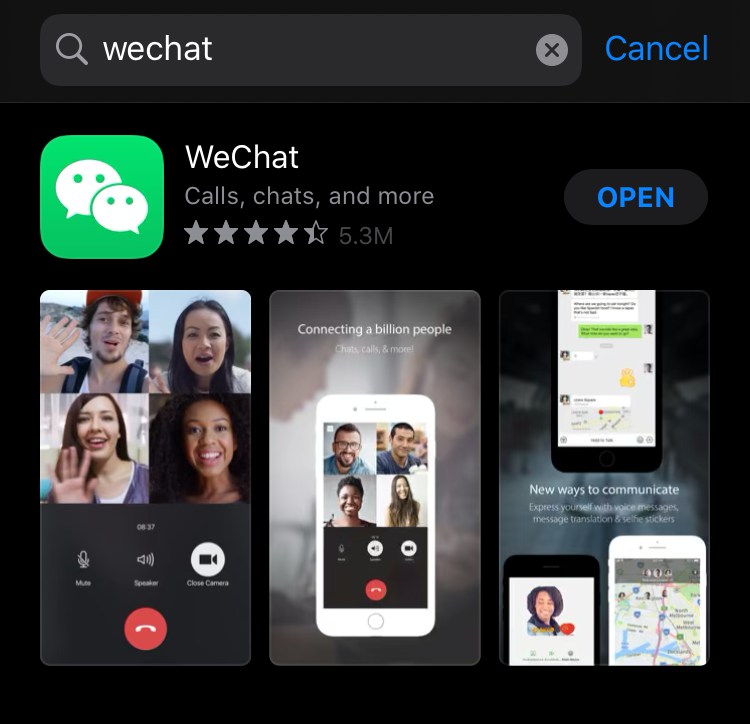
1.Simply download WeChat from App Store by searching WeChat.
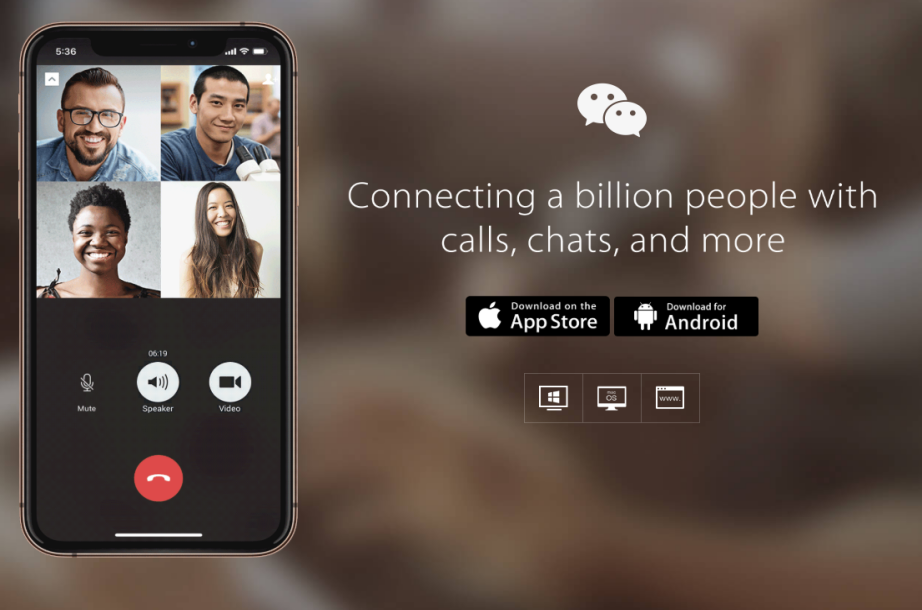
2. Download WeChat via the following website http://www.wechat.com/en/.
Step 2: Sign Up
1. Open WeChat, click “Sign Up,” and enter your phone number to get a text message with a verification code to complete the sign-up.
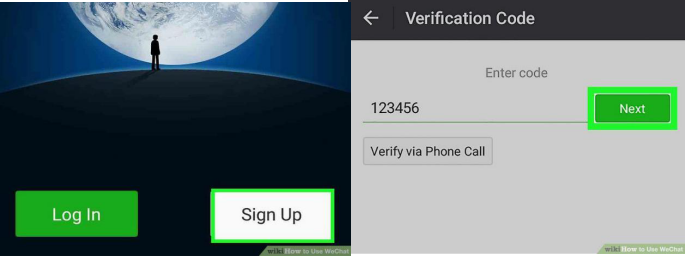
* If you don’t get a verification code, click No verification code received, and then click “Resend” to get another text message, or click “Phone Call” to get an automated phone call with the verification code.
Step 3: Add New Friends
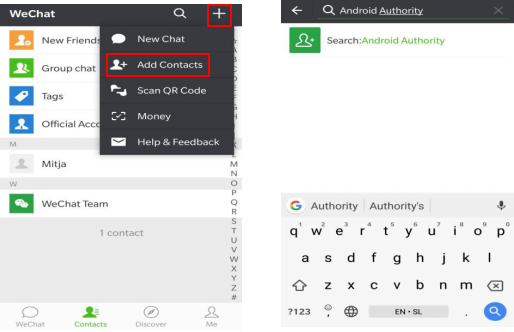
Click the “+” icon at the upper right corner, choose “Add Contacts” ,and search for people by phone number or WeChat ID, and add them to your contacts.
Step 4: Start a chat
Go to “Contacts”, click the friend’s name, and select “Messages” or “Voice or Video Call” to start a chat.
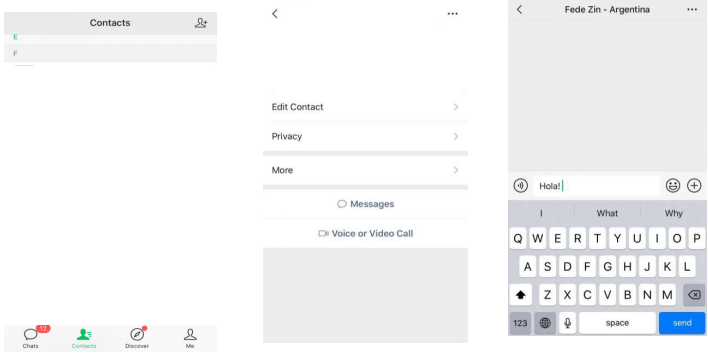
*If there is any problem during the use of the app, please refer to the following link for specific solution:https://help.wechat.com/oshelpcenter
What is WeChat Pay and how to use it?
WeChat Pay is a payment function integrated in the WeChat App, and users can complete the fast payment process through the mobile phone. WeChat Pay provides users with safe, fast and efficient payment services based on fast payment with bank cards. WeChat Pay is available in most retail stores, restaurants, hospitals, taxis, entertainment venues, and hotels.
Can foreigners use WeChat Pay in China?
The answer is yes. Foreigners can use WeChat Pay to pay in China. Current WeChat payment supports the linking and consumption of international bank cards such as VISA, MASTER, AMEX, JCB, DINERS\DISCOVER, etc.
How to link bank card with WeChat Pay?
1. Add bank card
2. Open the WeChat App, tap “Me” section on the right bottom and click “Wallet” under your profile picture. You can check your balance, top up mobile, buy tickets, order a taxi, and do lots of other things here. Then Click on “Cards” option and choose “Add a Card”.
3. Enter your bank card information
4. Please note that WeChat Pay only supports linking your own bank card. Enter your card number, select the type of card and the organization to which it belongs, and fill in the card information as well as your personal information like passport ID number, name, and phone number that your bank has on file. Then you will get a message with confirmation code. Enter the code into the prompt to verify the card linking.
5. Set a 6-digit payment password. After link the card to WeChat Pay, you will be asked to create a payment password. This password will be used for transaction payment.
6. Real Name Authentication. In order to comply with relevant laws and regulations, WeChat Pay now requires real name authentication for all users. After binding your bank card, you will also need to complete real name authentication before completing any payments. Real name authentication requires the following identity information:
●Your passport number or Mainland China ID card number;
●Your full name exactly as listed on your ID document, including capitalization and punctuation;
●Your mobile phone number, address, occupation, photo of your ID used above and clear photo of your face.
What type of bank card can be linked to WeChat Pay?
As of 2019, WeChat Pay supports a total of 408 banks (288 savings cards, 117 credit cards, and 3 foreign card organizations). Up to 10 bank cards of the same name (including credit card) can be bound to each WeChat payment account. Non-continental bank cards only support binding credit cards. When binding, you need to verify the card number, valid period, CVN2; US, Canada needs to verify the billing address.
How to use WeChat to pay?
1. Pay Vendor. (Quick Pay with a payment code) Open the WeChat APP, click the “+” in upper-right corner and tap “Money” to allow the vendor to scan QR code on your phone. The money will be automatically deducted from your bank account after enter the payment password. It’s convenient to use in stores, when you need to pay quickly.
2. Scan QR Code.The shop owners will put their own QR code on their store, if they don’t have a special machine to scan your QR code. When you buy things, you can take out your phone and then scan the QR code, the bill is paid. Just click “+” in upper-right corner, tap “Scan” to scan the QR code and enter the amount you will transfer to the cashier.
3. In-app Payment. WeChat Pay can be integrated into other APPs like Didi Taxi, etc. When you make a payment through these apps, just choose WeChat pay and the money will be deducted.
4. Receive Money. You are able to receive money from others through WeChat. Tap “Money” and choose “Receive Money”
How can I unlink bank card from WeChat Pay?
If you want to unlink the bank card, you can follow the steps below:
♦ 1. Start in “Me”, tap “WeChat Pay” and tap “Cards”
♦ 2. Select the specific card and tap it into the details page
♦ 3. Tap “…” menu on the top right corner
♦ 4. Tap “Unlink” at the bottom of the page to unlink the bank card.
How to cancel my WeChat Pay?
If you are using version 7.0 or later, you need to log into WeChat, click ”Me” section and ”WeChat Pay”, tap”…” menu in the top right corner, select “WeChat Pay Cancellation”, and then follow the instructions to cancel your WeChat Pay Account.
After cancellation, the data including card holder profile (name and identity document number), transaction history, remaining funds in Balance and Balance details will be cleared and cannot be restored. If the real name authentication has not been finished, “WeChat Pay Cancellation” won’t be accessed.
What is Didi and how to use it?
How DiDi works:
If you’ve already used Uber, DiDi won’t be difficult for you. You’ll have to enter your pick up location that corresponds to where the GPS shows your position, or different choices. In the English App you can enter your location in both English and Chinese, but you can’t enter a shared location received via WeChat. Next, insert your destination, again using the address in either English or Chinese characters, and then choose your type of course.
With the exception of calling a taxi, it will always calculate the estimated trip cost, though it doesn’t include unexpected diversions or excessive delays due to traffic.
There are two ways to use DiDi:
The first is to access the WeChat “wallet” section, and choose Ride Hailing. But here you won’t be able to use the app in English, even if your WeChat is installed in English.
The convenience is that direct payment is connected to Wechat and you don’t have to set up a new profile. Moreover, in the Chinese version (in the setting, you can change the language to English) of DiDi there are many more functions available than in the English version.
What you need to install Didi
First of all you’ll need a Chinese cell phone number, which must be active and works. In fact the drivers will identify you by the last four digits of your cell number. You need to enter a method of payment that is one of the ones listed on DiDi. The payment can be done via WeChat Pay.
How to install DiDi on your cell phone
Once you download the App you’ll have to enter your cell number (which is your identity!) and a method of payment. If the App is not in English, please click on the little flower symbol for settings and choose the second heading in the menu, where you’ll find English.
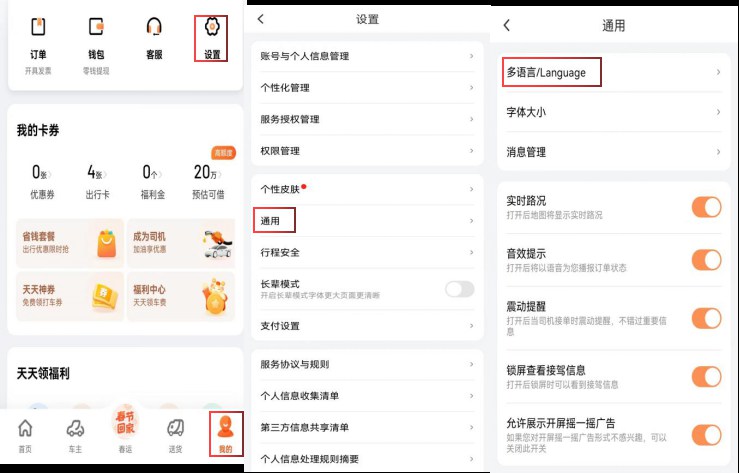
If you’ve decided to use Wechat or Alipay, check to see if you’ve adjusted the settings for automatic payment on the respective Apps: if not, it means that you’ll have to approve payment at the end of every trip.
The type of rides that DiDi offers
Taxi: DiDi has a big advantage in that you can also call for taxis, which remain the primary means of subsistence in certain cities. DiDi doesn’t calculate the hypothetical expense in advance, but sends you the meter at the end of the ride; nevertheless, the rides with private drivers will generally be cheaper. Taxis can also be paid with cash as long as it was called via DiDi, and you have the advantage of being able to get a paper receipt immediately after the end of the ride.
Express: in a few words these are private cars that offer transportation services. They are divided into Express Poll, Express and Select. The first is a ride shared with other passengers that “should” be on the same road as your destination, or a reasonable distance away, or are headed beyond your destination. The price is the lowest you can find on DiDi.
Premier: this is the option for a private professional driver. They present themselves much better than the Express drivers and should guarantee you a more comfortable drive and a more popular service. On board you’ll find water, battery chargers, an umbrella, tissues, etc. You can also choose the type of car: Comfort, Business Van (six seats) or Executive Class. The price doubles from the first to the third type, and the service becomes even more refined.
Luxe: DiDi Luxe is a service that at the moment is only available in Beijing, Shanghai, Shenzhen and Guangzhou. This is a top notch car with professional drivers that will greet you in a uniform and white gloves.


